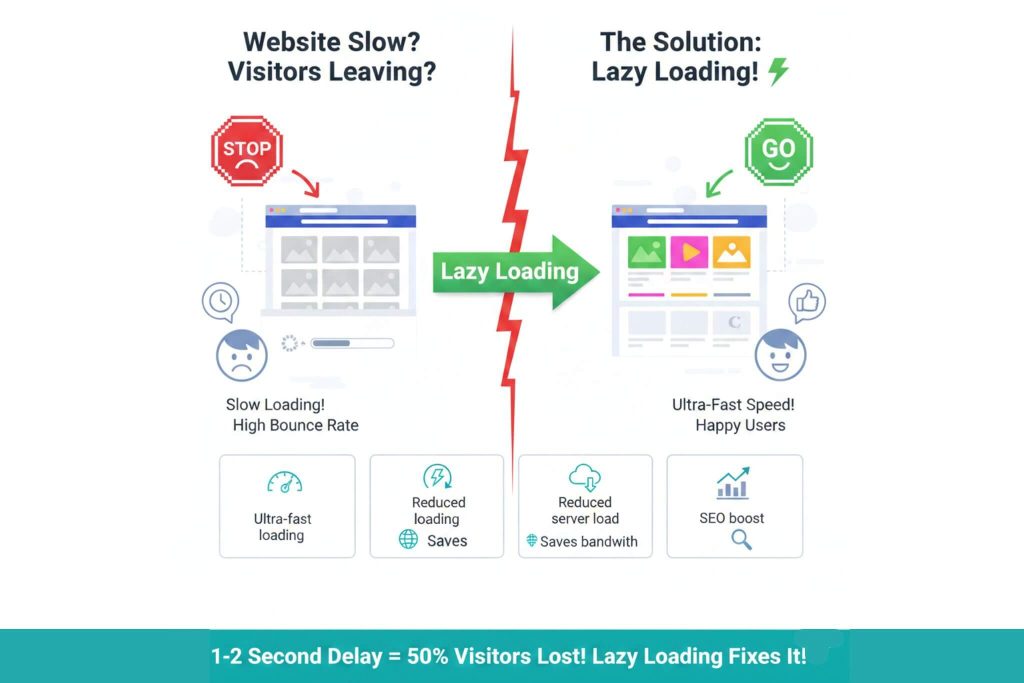
Is your website slow and driving visitors away immediately? A website slow to load is a major business problem today. You lose money when visitors leave. But there is a smart fix. It is called Lazy Loading. This technique makes sites faster and lighter.
Here is why you need to pay attention to this solution:
- It stops heavy media from loading all at once.
- It prioritizes the content the user actually sees.
- It keeps the website running smoothly on mobile.
- It reduces the data your server has to process.
- It helps you keep visitors on the page longer.
What Exactly is Lazy Loading?
Lazy Loading is a design pattern. It delays the loading of non-critical resources. This usually means images and videos. They do not load until the user needs them. The browser loads the top of the page first. The rest loads as the user scrolls down.
Think of it like a tunnel. You only light up the part you are walking in. You do not light the whole tunnel at once. That would waste electricity. Lazy Loading works the same way. It saves digital energy.
A standard website loads everything instantly. This is called “Eager Loading.” It forces the browser to download every image. Even images at the very bottom load immediately. This causes a traffic jam. The user sees a white screen. They wait for data they cannot even see yet. Lazy Loading stops this traffic jam.
Why Should You Use Lazy Loading?
You want a professional site. Speed is part of professionalism. If you are a wordpress developer or business owner, speed matters. Here is a breakdown of the specific benefits.
1. Ultra-fast Loading Speed
Speed is the first benefit. Only the visible part of the page loads. This is called “above the fold” content. Because the browser downloads less, it renders faster.
The user sees text and buttons immediately. They can start reading right away. They do not have to wait for footer images. This makes the site feel instant. A wordpress website design must focus on this speed. Fast sites make users happy. And happy users buy products.
2. Reduced Server Load
Your server has limits. Every image request takes resources. If 100 people visit at once, the server works hard. If your page has 50 images, that is 5,000 requests.
Lazy Loading reduces this. If a user only looks at the top, the bottom images never load. The server does not send that data. This reduces pressure on your hosting. It prevents crashes during high traffic. A wordpress full stack expert knows this saves money. You might not need an expensive server upgrade. You just need better resource management.
3. Saves Bandwidth for Everyone
Data costs money. This is true for you and your visitors. Lazy Loading saves bandwidth.
- For the Site Owner: You pay for data transfer. Less data transferred means lower hosting bills.
- For the User: Many people browse on mobile data. They have data caps. Loading unnecessary images wastes their plan.
If you respect their data, they respect your brand. This is vital for wordpress mobile optimization. Mobile networks can be slow. Lazy Loading makes your site usable on 3G or 4G connections.
4. Major SEO Boost
Google wants to serve the best results. Speed is a ranking factor. A slow site will rank lower. A fast site climbs the search results.
Google measures “Core Web Vitals.” One vital is Largest Contentful Paint (LCP). Lazy Loading improves this score. It helps the main content appear fast. If you want to rank, speed is key. You can combine this with wordpress yoast seo tools. But tools alone are not enough. The technical foundation must be solid. A wordpress agency or An Individual WordPress Expert will always recommend this for better rankings.
5. Better User Experience (UX)
User experience is everything. It defines how a person feels about your brand. A fast site feels modern and reliable. A lagging site feels broken and untrustworthy.
Lazy Loading reduces the “bounce rate.” The bounce rate is when people leave without clicking. If a page loads fast, they stay. They read your content. They look at your products. Good wordpress ux keeps them engaged. It makes scrolling smooth. It prevents the browser from freezing. This creates a comfortable environment for the visitor.
When Should You Use Lazy Loading?
Not every page needs it. But most modern websites do. Here are the specific scenarios where it is essential.
Pages with Many Images
Visual websites are heavy. Think of a photography portfolio. Or a travel blog. These pages have dozens of high-quality photos.
If you load them all at once, the browser crashes. The site becomes unusable. Lazy Loading feeds the images one by one. This is crucial for a wordpress template focused on media. It allows you to showcase high-resolution work. But it keeps the speed high.
Real Estate Websites
Real estate sites are massive. They have hundreds of property listings. Each listing has a gallery.
A wordpress real estate site cannot function without Lazy Loading. Imagine loading 50 houses at once. Each house has 10 photos. That is 500 images. The page would never finish loading. Lazy Loading ensures the user only loads the house they are looking at. This is a standard feature for any wordpress real estate project.
Blog and News Articles
Long-form content is popular. Guides and news stories are often very long. They use images to break up the text.
A reader might not finish the article. They might read half and leave. Why load images at the bottom? It is a waste. A wordpress content manager should use Lazy Loading here. It ensures the blog index page remains snappy. It helps the server handle many readers at once.
Embedding Videos and iFrames
Videos are the heaviest content type. YouTube embeds are heavy. Google Maps embeds are heavy.
If you have a video section, use Lazy Loading. Do not load the video player until the user scrolls to it. You can use a placeholder image instead. When they click, the video loads. This is a trick used by a smart wordpress plugin developer. It saves megabytes of data. It stops the page from lagging while scrolling.
Long Scrolling Sections and Landing Pages
Landing pages are designed to sell. They are often very long. They explain features, show testimonials, and offer pricing.
A wordpress landing page must load instantly. If it is slow, you lose the sale. You need the “Buy Now” button to appear fast. Lazy Loading handles the graphics down the page. This keeps the initial load time under one second. It is essential for wordpress speed optimization.
How to Implement Lazy Loading in WordPress
WordPress is a great platform. It makes Lazy Loading easy. You have several options to get this working.
1. Native Lazy Loading
WordPress is smart. Recent versions have native Lazy Loading. This means it is built-in. You do not always need a plugin.
However, it is basic. It works on standard images. But it might not work on background images. It might not work on complex sliders. A wordpress bug fix expert can check if it is working. They can inspect the code. They look for the loading="lazy" attribute. If it is there, you are on the right track.
2. Using Optimization Plugins
Sometimes you need more power. Plugins offer advanced control. They can lazy load scripts and videos too.
- Smush: This is a popular tool. It compresses images and lazy loads them.
- W3 Total Cache: This handles caching and speed.
- Autoptimize: This optimizes code and media.
A wordpress virtual assistant can install these for you. They can configure the settings. They ensure it does not break the layout.
3. Theme Settings
Many premium themes have this built-in. Themes like Astra or Divi offer toggle switches. You just turn it on.
Check your theme options. Look under “Performance” or “Speed”. If you use a page builder, check there too. WordPress oxygen builder has great speed controls. Elementor also has speed settings. A wordpress theme customization job often involves tweaking these settings.
4. Custom Coding
Sometimes plugins are not enough. You might have a custom site. You need a wordpress developer to write code.
They can use JavaScript libraries. They can target specific elements. This is good for unique designs. A wordpress woocommerce developer might need this for product grids. They need to ensure “Add to Cart” buttons work fast. Custom code ensures the lazy loading does not conflict with sales features.
Why is Speed So Important? The Data.
You might think a small delay is fine. You are wrong. The internet is competitive. Users are impatient.
The 1-Second Rule
Studies show clear data. A one-second delay reduces satisfaction by 16%. That is a huge drop.
If your site takes 3 seconds to load, you are in trouble. If it takes 5 seconds, the bounce rate skyrockets. It can go up to 90%. This means you lose 9 out of 10 visitors. No business can survive that.
Impact on Sales
Speed equals revenue. Amazon found this out years ago. Every 100ms of latency cost them 1% in sales.
If you run a store, this is critical. A wordpress woocommerce developer focuses on speed for this reason. A slow checkout page kills trust. Customers think the site is insecure. They abandon the cart. Lazy Loading keeps the product images crisp but fast. It keeps the customer moving toward purchase.
Common Issues and How to Fix Them
Lazy Loading is great. But it can cause issues if done wrong. Here is what to watch for.
The “Jumping” Content
Sometimes an image loads late. The text moves down to make room. This is called “layout shift.” It is annoying.
Google hates this. It hurts your Core Web Vitals score. To fix this, you must define image dimensions. Tell the browser the height and width. The browser reserves the space. The text stays put. A wordpress bug fix service can resolve this quickly.
Images Not Appearing
Sometimes you scroll, and nothing happens. The image stays blank. This is a script error.
It might be a plugin conflict. Two plugins might be fighting. Or the JavaScript is broken. You need to test your site. A wordpress virtual assistant can run these tests weekly. They ensure every image loads correctly.
SEO Visibility
Some bots cannot scroll. If content is hidden, they might not see it. However, Google is smart now. It can render lazy loaded content.
But you must be careful. Ensure your main keywords are not hidden. Keep essential text loaded normally. Only lazy load the heavy media. A wordpress agency will audit this. They check if Google indexes all your pages.
Integrating with Other WordPress Services
Lazy Loading is one piece of the puzzle. It works best with a complete strategy.
SEO and Content
You use wordpress yoast seo for keywords. That is good. But Yoast also checks readability. Speed is part of the user journey.
If you have a wordpress content manager, train them. Tell them to compress images before uploading. Lazy Loading helps, but small files are better. Big images still take time to download. Combine compression with Lazy Loading.
Design and Layout
A wordpress website design must look good. But it must perform well. Designers sometimes use huge files.
You need a balance. A WordPress full stack developer bridges the gap. They take the design and make it fast. They ensure the code is clean. In that case as an experienced WordPress Developer I ensure the WordPress oxygen or Elementor templates are optimized.
Ongoing Maintenance
The web changes fast. Browsers update. Plugins update. Your lazy loading might stop working.
You need regular checks. A wordpress virtual assistant is perfect for this. They can check speed scores monthly. They can update plugins and ensure your wordpress template stays current.
Conclusion: Speed Wins the Race
The internet is getting heavier. Images are getting bigger. Videos are 4K. But networks are not always perfect. And your website slow issues are hurting you.
Lazy Loading is the bridge. It connects high-quality media with fast performance. Your site becomes more friendly for mobile users. Google also views the site more favorably because of the improved speed. And most importantly, it makes your site friendly for humans.
Do not let a website slow to load destroy your hard work. You have the tools. You have the knowledge.
- Audit your site today.
- Check your speed scores.
- Install a lazy loading solution.
- Watch your bounce rate drop.
If you need help, hire a pro. A WordPress developer can build custom tools. An agency can completely upgrade your strategy. And a bug-fix expert can handle conflicts without trouble.
The goal is simple. Keep the visitor. Make sure they stay happy. Lead them to keep reading. Speed is the foundation of success online. Start using Lazy Loading now. Your visitors will thank you.
Stop Losing Revenue to a Slow Loading Bar
Your content is great, but nobody sees it if your site lags. A slow website is a leaky bucket for your budget, so you must plug the holes immediately.
You don’t have to struggle with complex code alone. As a professional wordpress developer, I specialize in turning sluggish sites into lightning-fast experiences. Whether you need urgent wordpress speed optimization, a quick wordpress bug fix, or a full wordpress website design audit, I deliver results that rank.
Ready to speed up? Don’t let another visitor bounce because of a delay. Contact me today, and let’s make your website instantly responsive and impossible to ignore.